Close
Picture of XMod Pro 4.9 - DNN's Most Powerful Form Builder since 2004

XMod Pro — The Everything Builder for DNN. Since 2004

posted by DNNDev.com - 05/18/2020
$149.95
$259.95
$499.95
Buy 4.9 today · XMod Pro 5 included free when it ships

DNN gives you a website. XMod Pro gives it everything else.

Build almost anything a DNN site can do — contact forms, member directories, product catalogs, data dashboards, a help desk, a CRM. Real applications, backed by real SQL. Start quickly in the visual builder with no code, then reach for HTML, CSS, JavaScript, SQL, even your own .NET extensions as you grow.

Our module. Your data. Your site: finished.

✓ Building for DNN since 2004 ✓ One price, unchanged since 2009 ✓ Thousands of sites trust XMod Pro
What you buy today

XMod Pro 4.9 — ready now

The current, production-ready release. Install it and start building immediately — stable and shipping today, on DNN 9.2–10+.

Included free

XMod Pro 5 when it ships

Your purchase includes the upcoming v5 release at no extra cost — plus optional early access to the v5 beta right now.

One module instead of many

Most DNN sites add a new module for every new feature. Yours can do it all with one.

Every time your site needs to do something new, the usual answer is another module — from another vendor, with its own admin screens to learn, its own update and security cycle to track, its own license to renew. Five features, five things to keep updated. XMod Pro brings it all into one: one way of working, one thing to maintain, one vendor that's been here for 22 years.

What most sites end up assembling

A news / blog module
A gallery module
A forms module
A data-grid / reporting module
A directory
Different vendors · different update cycles · different everything

Or one XMod Pro

One module builds all of it, plus whatever you dream up next. 

A complete application builder

If a DNN site can do it, you can probably build it here.

Take the Q&A section running on dnndev.com. When we moved off the Evoq edition of DNN, its built-in Q&A and forum didn't come along — so we rebuilt both in XMod Pro, and improved them on the way: up-voting, threaded replies, Markdown, better tagging. Not a five-minute job — but a fraction of coding it from scratch, because the building blocks were already there.

A Q&A section built in XMod Pro — the dnndev.com Questions list with search, filter chips, tag filtering, and per-question vote, response, and view counts.
A Q&A section with search, filtering, up-voting and threaded replies — built and running in XMod Pro.

And that's just one example. Here's a sample of what else people build with it:

Forms & input

  • Contact & feedback forms
  • Member registration flows
  • Event sign-ups & RSVPs
  • Intake, application & quote forms
  • Surveys & polls
  • Lead capture

Directories & listings

  • Staff, team & member directories
  • Business & resource directories
  • Product catalogs
  • Real estate / property listings
  • Classifieds & job boards

Media & documents

  • Photo galleries & sliders
  • Video galleries
  • Document libraries with metadata
  • Testimonial rotators

Events & scheduling

  • Event calendars & detail pages
  • Schedule & agenda displays
  • Booking, RSVP & registration

Knowledge & community

  • FAQ & knowledge-base sections
  • Help docs with search
  • Q&A with up-voting & threaded replies
  • Discussion forums
  • Comments, reviews & ratings

Reports & dashboards

  • Admin dashboards on SQL views & procs
  • Back-office data tables for staff
  • Export utilities (CSV, JSON, RSS)
  • Drop-in JavaScript & HTML widgets
One module, two ways to build

Start by clicking. Grow into code.

Most tools make you pick a side — an easy one you'll outgrow, or a powerful one you'll struggle to even start. XMod Pro doesn't. The friendly way in and the deep end are the same product, so you pick up new skills exactly when a real project calls for them — never before, never all at once. You don't just build more here. You grow.

"One of our customers started here knowing no code at all. Today he's a working developer at a financial firm."
What you control

Your data. Your layout. Your rules.

Every purpose-built module arrives with someone else's opinions baked in. XMod Pro arrives with none of that.

Your data

Whatever you need to track, in whatever shape. XMod Pro reads and writes the DNN database directly — and other SQL Server databases too. Your tables, your stored procedures, your views.

Your layout

Forms and output look the way you want. Your HTML, your CSS, your class names — no module-author styling to override, no "theme" to work around.

Your rules

Which fields are required. What gets validated and how. What happens on submit. What filters appear. What's gated behind which roles. Nothing is a default you have to fight — it's whatever you decide it should be.

✦ Coming in Version 5 · included free

An IDE for DNN.

XMod Pro 5 is rebuilt from the ground up to work the way modern developer tools do — so you spend your time building, not relearning. If you live in an editor like VS Code, it'll feel familiar from the first click. But it's not a VS Code clone — it's purpose-built for XMod Pro, handcrafted to make you more productive. Buy a license today and it's yours free, with early access to start building in the v5 beta now.

How complete is the beta? Complete enough that we run dnndev.com on XMod Pro 5 right now.
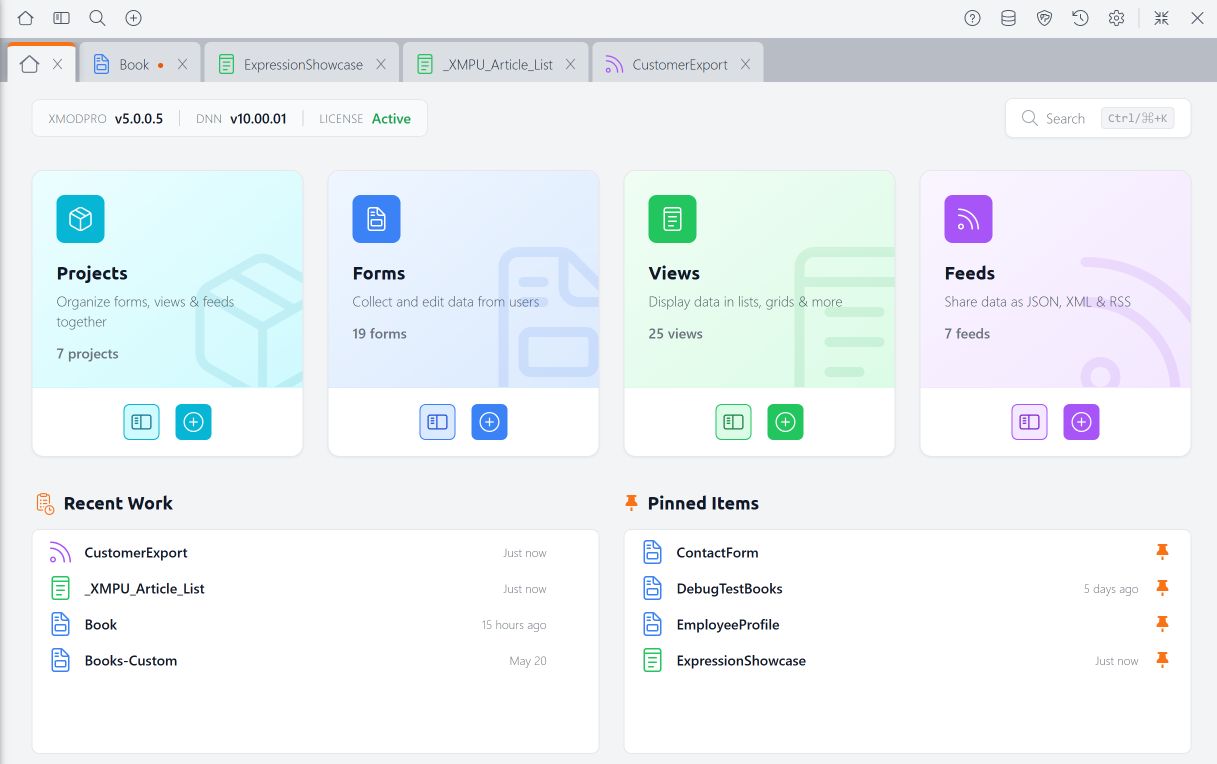
The XMod Pro 5 Control Panel dashboard showing Projects, Forms, Views, and Feeds resource cards alongside Recent Work and Pinned Items panels.
The XMod Pro 5 Control Panel — your projects, forms, views, and feeds, in one workspace.
  • Design real forms, visually — not just a stack of fields, but headings and sections, panels and tab strips, multiple fields per row, even your own CSS and JavaScript blocks. Lay it out by dragging; edit any control inline on the canvas.
  • Work the way you already think — tabs, smart editors, global search (⌘K / Ctrl+K) and a command palette. Stop closing one resource to look at another.
  • Keep a whole solution in one place — group its forms, views & feeds as a Project and open the lot in a single click.
  • Own your data layer without leaving XMod Pro — create and alter tables, indexes and keys, and see the exact SQL before it runs.
  • Experiment without fear — every save is backed up and versioned, with line-by-line diffs to compare and roll back. Forms built in the Form Builder get plain-English diffs on top — 'First Name field renamed,' 'checkbox removed.'
  • See exactly what's happening — Debug Mode shows the real SQL it runs, every token's resolved value, and per-step timing that pinpoints a slow query before it becomes a slow page.
  • Ship multilingual the easy way — a spreadsheet-style editor with the translation gaps flagged for you.
  • Catch problems before users do — a one-click Watch Dog scan flags security and configuration issues across your forms, views, and feeds.
  • New — Expression Tokens — add calculations, conditionals, and formatting right in your markup, with no server code. Format a price, show 'In Stock' when there's inventory, or set a CSS class on the fly.
Best reason to buy today

Buy now → get XMod Pro 5 free

Buy XMod Pro 4.9 today and v5 is yours free — it lands in your account the moment it ships, at no extra cost. No need to wait to dig in, either: you can start building in the beta right now.

Choose your license above ↑

Early access available to customers only.

Build in 4.9 today, and nothing's lost in the upgrade. When your free v5 arrives, your forms, views, and feeds come along unchanged — v5 layers new capabilities on top, it doesn't rewrite what you've made.

Under the hood

Everything you'd expect, in one module

Forms & data entry

  • Drag-and-drop Form Builder
  • Full control set (text, date, rich text, file upload & more)
  • Complete validation, incl. CAPTCHA
  • Custom registration & role management
  • Email notifications, success messages & redirects

Data views & display

  • Design any layout with full HTML, CSS & JavaScript
  • AJAX views without writing JavaScript
  • Built-in search, sort & paging
  • Feeds: RSS, XML, JSON, Excel, CSV
  • Write to the page— title, meta & OG tags
  • DNN Search integration

Developer power

  • Use your own SQL queries, stored procedures & views
  • Integrated database table designer
  • Smart code editors — syntax highlighting, autocomplete, code folding & structure navigation
  • Extensible — build your own controls in .NET
  • Share forms, templates & feeds across portals

22 years on DNN. Same team. Same priorities.

XMod shipped in 2004, when DNN was still called DotNetNuke. XMod Pro launched in 2009. Version 5 ships in 2026. Many vendors and modules have come and gone — but we've remained, because your success has always been our product, not the software.

"XMod Pro allowed us to quickly build custom functionality for the dnnsoftware.com launch. It is one of the very few third-party modules that we allow on the site."

— Joe Brinkman, Co-Founder & Former Technical Fellow, DNN Corp.

"This module has transformed what we can build within DNN and has become the core of solutions we build for every client site. The ability to build anything and everything in DNN is invaluable! This is one of the MUST-HAVEs in our DNN toolbox!"

— Ryan, DNN Store review

"This is my favorite module in the DNN store. It is a huge time saver."

— Mark Luffred, Pharma International

"Where would I be without XMod Pro? I have built dozens of apps with it."

— Angus Beare, Developer
No subscription traps

Buy it once. Own it forever.

A lot of software doesn't work that way anymore — you stop paying and it stops working. XMod Pro is different. Your license is perpetual: it never expires and never stops working, whether or not you ever renew. The subscription funds new versions and support. It doesn't hold what you've built for ransom.

XMod Pro 5 free
Included with your purchase
1 year of upgrades
Free major & minor releases
Localhost license
Free dev / staging license
Direct support
From the people who build it
Questions people actually ask

The short answers.

Do I need to know .NET?

No. XMod Pro is built around its own focused templating language. HTML helps for views and feeds; with the Form Builder you don't even need that.

Which DNN versions does v5 support?

DNN 9.2 and later in the 9.x line, and DNN 10 and later. Older builds for DNN 5.x–9.1 remain available to existing license holders.

What database does it need?

SQL Server. You can access both the DNN database and external SQL Server databases.

I already own v4 — what's different in v5?

A lot: a new Control Panel, tab-based editing, global search & command palette, Projects, auto-backups with semantic diffs, a rewritten Form Builder, full table editing, built-in localization, and Debug Mode — on a modern, jQuery-free Control Panel.

Get XMod Pro today — and get v5 free.

Build something real this afternoon, grow into the deep end whenever you're ready — and step into XMod Pro 5 the moment it ships.

Get XMod Pro — and v5 free ↑
DNN 9.2–10+ · SQL Server · Azure compatible · from KnowBetter Creative Services LLC