
DNN-aware security and site protection
DNN Defender
Protect your DNN website with layered malware detection, application-aware WAF controls, advisory protection and actionable security insights. Support for DNN Platform 7.2+, 8, 9.x and 10.x+.
Explore the live demo Read the documentation
Application-aware defense in depth
What makes DNN Defender different?
DNN Defender adds application-specific protection to your existing security stack. It brings the DNN context, investigation tools and protection choices closer to the administrator who knows the site.
| Capability | General-purpose security tools | DNN Defender |
|---|
| Application context |
AV and hosting WAF provide valuable endpoint and HTTP protection; DNN-specific context depends on their integration and rules. |
DNN-aware controls connect application routes, executable content, installed modules and advisory exposure in one host console. |
| Webshell detection |
Modern AV can combine signatures, heuristics and behavioral analysis. Coverage varies with payload, obfuscation and policy. |
Rules and structural analysis inspect ASP.NET/DNN server-side content; optional offline AI in the DNN 9/10 edition adds classification for ambiguous code. |
| Published DNN advisories |
Generic request filtering may need custom rules to recognize application-specific attack paths. |
Advisory Shield provides mapped DNN controls, with Audit and Strict modes and explicit coverage status for each advisory. |
| Custom and third-party APIs |
A module endpoint may require a separate security review even when no public CVE exists. |
API Security Scanner examines installed controllers, ASHX and ASMX services to prioritize risky routes, permission guards and sensitive capabilities. |
| Protection that fits the site |
Independent products can require separate policies and operational workflows. |
Choose On Demand, Auto Monitor, Smart or Strict Protection; enable only the functions needed and configure the monitored folders for your site. |
| Integrity and response |
File alerts alone may leave administrators to assemble context across tools. |
FIM compares a reviewed baseline; quarantine, safe evidence review and audit history support investigation and response. |
| Operational visibility |
Security events and application health are often reviewed in different consoles. |
WAF outcomes, scan evidence, scheduler status, site health and formatted email reports are brought together for the DNN host. |
Purpose-built for DNN
Security with application context
DNN Defender is a purpose-built security module designed exclusively for DNN Platform (DotNetNuke) websites. It empowers administrators to detect, analyze, and respond to webshells (malicious backdoors), hidden malware, obfuscated scripts, suspicious uploads, and other signs of compromise — before they escalate into major security incidents.
Traditional security measures from hosting providers are valuable, but may not provide the DNN-specific context needed to assess third-party modules, executable files, or unusual administrative requests. Sophisticated attackers may use fileless techniques, heavy obfuscation, in-memory execution, and legitimate .NET/IIS APIs to complicate detection.
DNN Defender closes these gaps with a multi-layered detection architecture that combines advanced security rules, structural code analysis, and a lightweight offline AI engine where enabled. Rather than depending solely on file hashes, the module examines code structure, logical flow, and security-relevant behavior — uncovering suspicious functionality inside obfuscated or dynamically generated scripts.
This execution-aware static inspection identifies concealed backdoors, dynamic payload builders, and persistence indicators without ever executing the code being scanned.
Expanded DNN support and security coverage
- DNN 7.2+, DNN 8, DNN 9.x and DNN 10.x+: choose the package for your platform. The DNN 7/8 edition keeps rule-based and structural detection without ML.NET; the DNN 9/10 edition retains the optional offline AI engine. Both editions use the same host-focused security workflow.
- API Security Scanner for custom and third-party modules: inspect installed module controllers, ASHX handlers and ASMX services without executing target assemblies. It maps candidate routes, HTTP methods, permission guards and reachable file, database, process and network capabilities to help uncover security oversights in your own code, in-house modules and third-party extensions. Findings are prioritized for review; a candidate endpoint is not automatically a confirmed vulnerability.
- DNN advisory coverage: Security Risk Analysis distinguishes targeted controls, partial controls and findings with no mapped request-layer control. Advisory Shield and WAF modes let administrators choose observation or enabled request blocking for supported attack paths.
- Formatted security email and reports: host-facing summaries include persisted malicious scan findings and evidence, separating stored findings from newly confirmed incidents. Immediate alerts and scheduled reports are configurable.
- Site and server health: Server Health, Pulse, FIM Status, and Reports put operational faults alongside security signals. Scheduler status and controls indicate whether automated protection is active or only manual scanning is available.
- Clearer WAF investigation: Detection and Prevention outcomes, matched request evidence, and actual HTTP outcomes are shown separately; routine site-owned tests need not become high-priority attack alerts.
- Safer operations: bounded archive scanning, clearer scan and quarantine evidence, and protection-mode handling for planned DNN, module, or skin upgrades.
Inside the host console
Protection and investigation in practice
 WAF Dashboard: review the active operating mode and request-protection controls.
 WAF event audit: distinguish observed traffic from requests actually blocked.
 Settings: configure Advisory Shield and general request inspection independently.
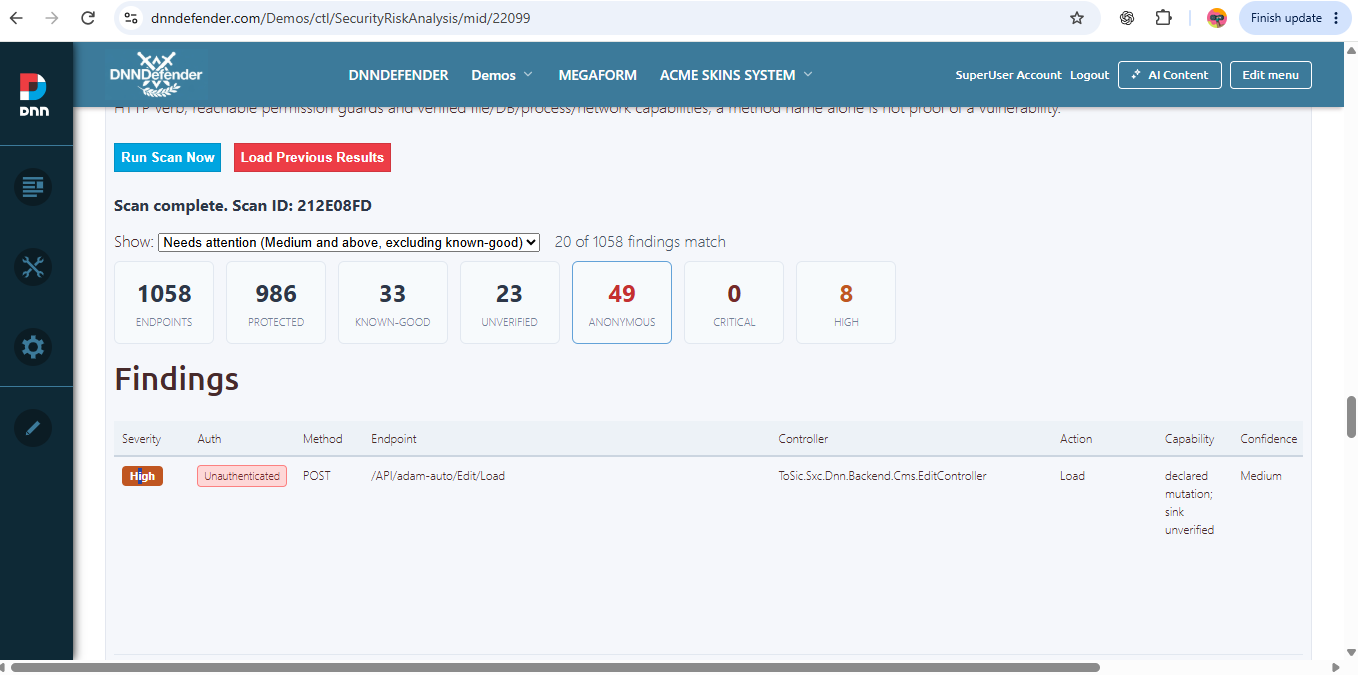 API Security Scanner: prioritize exposed endpoint candidates across installed modules. Counts shown are site-specific examples.
Beyond detection, DNN Defender offers multiple proactive protection modes that reduce risk even before a specific threat is fully classified. These controls address high-risk behaviors commonly used during webshell deployment and post-exploitation — such as suspicious script uploads, abnormal file modifications, and exploit-style request patterns — while keeping the host in control of which actions observe and which actively block.
Runtime Protection Layer (WAF + Abuse Control)
DNN Defender operates as a DNN-aware Web Application Firewall (WAF) with flexible control modes: prevention, detection-only observation, or temporary disablement when required.
- WAF Prevention / Detection / Off with configurable enforcement levels
- Exploit-style request detection including payload injection and probing attempts
- Automated abuse throttling for repeated violations or suspicious IP behavior
- Spam-form and bot mitigation to reduce automated submission floods
Protective actions remain configurable. Detection records matching traffic; only enabled Prevention controls block it. The event log shows the observed HTTP outcome.
Advanced Threat Recognition Engine
The system is engineered to detect modern webshell attack patterns and evasion techniques, including heavily obfuscated threats in DNN-relevant server-side content:
- Obfuscated and minimalistic webshells / backdoors with runtime reconstruction
- Polymorphic and dynamically generated malicious code that can evade static signatures
- Command execution chains and unauthorized file-system manipulation (file-manager, dropper + exec)
- Dynamic .NET code loading and suspicious process or network capabilities
- Disguised or archive-contained executable payloads within configured scan limits
The scanner retains matched evidence for review. A finding is not by itself proof that code executed or a site was compromised.
Beyond file-level scanning, DNN Defender performs security risk analysis to uncover signs of exposure or existing compromise — including suspicious module endpoints, stealth persistence mechanisms, and unauthorized system modifications.
File analysis runs on your own server. The offline detection engine does not require sending source files to an external scanning service; optional integrations and notifications remain under administrator configuration.
Core Protection Capabilities
Hybrid Threat Detection
Combines deterministic rules, deep behavioral signals and structural code analysis. The DNN 9/10 edition also offers an optional offline ML.NET model tuned for ASP.NET/DNN attack patterns; the DNN 7/8 edition operates without ML.NET.
Integrated Web Application Firewall (WAF)
Inspects inbound requests for exploit payloads, SQL injection, XSS, probing scans, abnormal traffic, and automated abuse. Detection observes; Prevention blocks matched requests when enabled.
DNN-Aware Security Intelligence
Understands DNN structures, trusted paths, and common module behaviors to reduce avoidable false positives while retaining actionable evidence.
Advanced Webshell & Backdoor Detection
Analyzes classic and heavily obfuscated ASPX/C# shells, dynamic code execution indicators, and supported archive-contained payloads without executing the samples.
File Integrity Monitoring
Compares important server-side files with a host-approved baseline and highlights unexpected changes, persistence mechanisms, and suspicious uploads.
Secure Quarantine & Audit Trail
Provides controlled isolation, forensic metadata, investigation history, and safe review workflows for administrators.
Site Health & Reporting
Combines scan findings, WAF activity, scheduler status, server health, formatted email reports, and configurable alerts in one host-focused console.
Choose the mode that fits your workflow
| Mode | How it is used |
|---|
| On Demand |
Host starts a scan manually; no automatic realtime file protection is implied. |
| Auto Monitor |
Scheduled/realtime observation with queued scanning; review findings before quarantine. |
| Smart Protection |
Automatic protection for newly created or uploaded executable files when the configured evidence threshold is met. |
| Strict Protection |
Faster response for newly created or uploaded executable files. Use the maintenance workflow for planned DNN and extension installs. |
Practical protection, with clear boundaries. WAF Prevention blocks only requests matched by enabled controls; Detection records them without blocking. A static API finding does not prove a route is reachable or that an exploit succeeded. Scan or quarantine results depend on scope, configuration, and the site's current state. Keep DNN and installed extensions patched.
Start with a reviewable baseline
- Install on a compatible DNN site and open the host console.
- Run the first security and file scans; review high-priority evidence and known-good site files.
- Choose alert recipients, scheduled reporting, WAF mode, FIM baseline, and the protection mode that matches the site's change process.
- Before a planned module or skin upgrade, use maintenance mode; review the change and re-enable protection afterward.
What's new in 03.03.19
Targeted pre-processing inspection now strengthens the legacy DNN personalization-cookie attack path. Advisory evidence is clearer, while the existing file scanner, WAF modes, FIM, API security checks, site-health monitoring and formatted reports remain available according to edition and configuration.
Compatibility and editions
Platform: DNN Platform 7.2+, DNN 8, DNN 9.x and DNN 10.x+ on .NET Framework 4.8. Use the non-AI package for DNN 7/8 or the AI-capable package for DNN 9/10. Trial: on-demand file scanning and results review only. Realtime, WAF, FIM, API Security Scanner, Pulse and reporting require the appropriate licensed edition.
Read the product documentation | Explore the DNN Defender demo
Documentation and first steps
The product documentation covers installation, first security baseline, WAF and Advisory Shield modes, API Security Scanner findings, incident review and reports.
Browse the DNN Defender documentation
Download the Trial edition
Both Trial packages support on-demand file scanning and results review only. Choose the installer that matches your DNN version.
Trial download — DNN 7.2–8.x (no AI; .NET Framework 4.8)
Trial download — DNN 9.13+/10.x (AI-capable; .NET Framework 4.8)